
商务通可以定制中间邀请框,用一个图片取代原来的邀请框。但是这个图片的url是定制的时候固定死的,后面要再改就要再花几百块。不过我们可以用JavaScript来替换图片url。
// 重设商务通中间定制图片的url
setInterval(function () {
	try{ //如果检查到中间图片,则替换其src
		document.querySelector("#LRdiv1 img").src="http://www.my.com/swt_center.gif";
	}catch(err){
		console.log(err.message);
	}
},1000)
<img src="/f/head15.jpg" id="stwRight">
<img src="/f/saber%E8%A1%A8%E6%83%85_1_1.jpg" id="stwCenter">
<img src="/f/x.png" id="swtClose">
<style type="text/css">
	#LRdiv0,#LRdiv1{display:none !important;}
	#stwRight{position: fixed;right: 0;top: 60px;display: none;z-index: 999;cursor: pointer;}
	#stwCenter{position: fixed;display: none;width: 400px;height: 350px;left: 50%;margin-left: -200px;top: 50%;margin-top: -175px;z-index: 999;cursor: pointer;}
	#swtClose{position: fixed;display: none;width: 24px;height: 24px;left: 50%;margin-left: 175px;top: 50%;margin-top: -175px;z-index: 9999;cursor: pointer;}
</style>
<script type="text/javascript">
	window.onload=function(){
		function showSwtC(){
			document.getElementById("stwCenter").style.display="block";
			document.getElementById("swtClose").style.display="block";
		}
		function showSwtR(){
			document.getElementById("stwRight").style.display="block";
		}
		function hideSwtC(){
			document.getElementById("stwCenter").style.display="none";
			document.getElementById("swtClose").style.display="none";
		}
		function hideSwtR(){
			document.getElementById("stwRight").style.display="none";
		}
		function openSwt(){
			LR_HideInvite();openZoosUrl();return false;
		}

		showSwtR();
		setTimeout(function(){
			hideSwtR();
			showSwtC();
		},4000);
		document.getElementById("stwRight").onclick=function(){
			openSwt();
		}
		document.getElementById("stwCenter").onclick=function(){
			hideSwtC();
			showSwtR();
			openSwt();
			setTimeout(function(){
				hideSwtR();
				showSwtC();
			},8000);
		}
		document.getElementById("swtClose").onclick=function(){
			hideSwtC();
			showSwtR();
			setTimeout(function(){
				hideSwtR();
				showSwtC();
			},8000);
		}
	}
</script>
侧边浮窗没做关闭按钮。
因为openSwt()里用了商务通自带的函数openZoosUrl(),所以页面上还是得加载商务通代码。如果把openSwt()改成直接用网址跳转,则不用加载商务通代码。
上面商务通不仅样式是我们自己做的,显示、隐藏的逻辑也需要自己定义。实际上对于有商务通代码的页面,我们可以直接利用商务通自身的函数来“偷梁换柱”,打开我们自己的商务通图片。
var sTimer = setInterval(function(){
	if(typeof LR_showInviteDiv != "undefined"){
		window.LR_showInviteDiv = function(){	//此处改写了商务通显示邀请框的函数
			showSwt();
		}
		clearInterval(sTimer);
	}
},100);
LR_showInviteDiv是显示邀请框的函数,如果页面上有这个函数,则改写它,让它执行showSwt,也就是我们自己定义的一个函数,显示自己的邀请框。
恩……我对这这个代码研究了好久,发现这个办法并没有多方便,浪费时间。唯一的优点是不用写css来隐藏商务通的邀请框了。另外改写商务通的这个函数会导致商务通客户端发送邀请失败。麻烦。
商务通的无轨迹通常是由于用了“仅超链接”点击进来的;把商务通超链接做成中间页跳转也会发生同样的问题。因此我们尽量把商务通链接都用商务通自带的函数打开咨询窗口:
<a href="#" onclick="LR_HideInvite();openZoosUrl();return false;" target="_blank"></a>
也可以写成函数方便调用:
function swtClick()
{
LR_HideInvite();
openZoosUrl();
return false;
}
但第三方网站上不能这么做,目前只能在链接后面加上对话入口说明和入口网址了。
最近做了两个手机站,美工的设计稿都是640px宽,但是商务通弹窗图片是260px宽,放在页面中显得很小。无奈进行放大。(我很好奇在商务通后台能不能把弹窗尺寸设置得比图片实际宽高大。那样就很省事了。)
商务通弹窗处的主要结构如下:
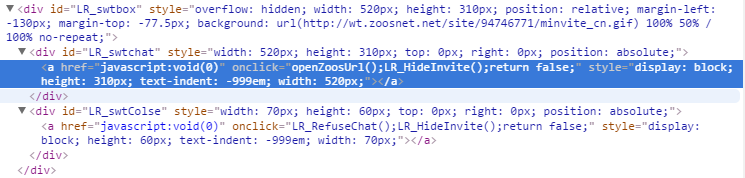
其中LR_swtbox是控制弹窗图片大小,图片是它的背景图。LR_swtchat和LR_swtchat a是打开咨询窗口的链接,LR_swtColse和LR_swtColse a是关闭弹窗的按钮。
css样式如下:
#LR_swtbox{width:520px !important;height: 310px !important;margin-left: -130px;margin-top: -77px;background-size: 100% !important;}
#LR_swtchat,#LR_swtchat a{width:520px !important;height: 310px !important;}
#LR_swtColse,#LR_swtColse a{width: 70px !important;height: 60px !important;}